First-run onboarding
From a fresh clone to your first attributed transcript, with no config to hand-edit.
From a fresh clone to your first attributed transcript, with no config to hand-edit. Three pieces do the work: a guided installer brings the stack up, a first-run setup wizard configures it in the browser, and a bundled guided tutorial walks one full run end to end.
New here? Install Docker and start the stack first with setup.md, then come back for this in-browser walkthrough. Day-2 operations (migrations, recovery, backup, endpoint reference) live in operations.md; this doc is only the first-run path.
Why it exists
Voxint's operators are often non-technical: researchers, journalists,
educators. The first-run path can't assume fluency with env files or compose
overlays. The manual path works (copy .env.example, edit it,
docker compose up -d, then learn the review workflow by reading), but it
front-loads every decision before you have seen the tool run once.
The onboarding path defers what it can. The installer asks only for what it cannot invent: an admin password, a media folder, and which compute tier runs the model services. Everything else is set from inside the running console, against a sample you can watch work before you point Voxint at your own audio. All model weights, diarization included, are vendored into the images, so no Hugging Face account or token is involved.
1. Guided installer
git clone https://github.com/bengizmo/voxint.git && cd voxint
./scripts/install.sh
scripts/install.sh is a Bash 3.2+ script for macOS and Linux (run it with
bash, not sh; it needs nothing at runtime beyond Docker). It:
- preflights Docker and the Compose plugin (≥ 2.24; the legacy v1
docker-composebinary cannot parse this stack); - prompts for an admin password, a media folder, and a compute
tier for the model services (GPU / AMD / CPU / Apple / none-for-now).
It inventories every GPU on the host, measures free VRAM on each, and
recommends the tier that fits. On a multi-GPU host it presents a numbered
list and lets you pick which card to target. If a card's VRAM is mostly
occupied (for example by a co-resident local LLM), the installer explains
why and suggests CPU instead. On Apple Silicon Macs it recommends the
metal tier. It auto-generates the rest (including a random
CSRF_SECRET). The CPU tier holds the models in RAM and needs ≥ 8 GB available to the container host. On Docker Desktop that is the VM memory limit, not the physical machine; see operations.md; - renders
.envfrom.env.example, never overwriting an existing.envwithout first taking a timestamped backup. The tier choice is recorded asVOXINT_COMPOSE_TIER, so re-runs start the same overlay (a pre-0.4.1.envis asked about once and updated in place, with a backup); - detects host-port collisions (
API_PORT,POSTGRES_PORT,REDIS_PORT) and offers a free alternate; - on the GPU tier, reads your card and writes a small installer-managed
compose.hardware.yamlwith conservative caps that pin the model services to your chosen card (it works one recording at a time so a modest GPU does not thrash), folds it into the stack it starts, and never overwrites a compose file you edited yourself. Two read-only diagnostics preview the detection without changing anything:./scripts/install.sh --gpu-check(quick inventory and recommendation) and./scripts/install.sh --hardware-dry-run(full preview including the compose override); details in operations.md; - pulls the pinned release images, starts the stack (core control plane plus the chosen tier's model services), polls the API container's healthcheck, then prints the console URL.
It is safe to re-run. With a container tier chosen, the stack it starts can
process audio end-to-end. If you picked "none for now", only the core
control plane starts. The completion notice says so, and prints the exact
overlay command to run later, rather than letting a run fail silently on a
missing service. The Apple metal tier installs in two steps by design: the
installer starts the core stack, then hands off to
scripts/metal/voxint-metal.sh setup && up for the native model services. It
states outright that submissions fail until that has run
(operations.md).
2. First-run setup wizard
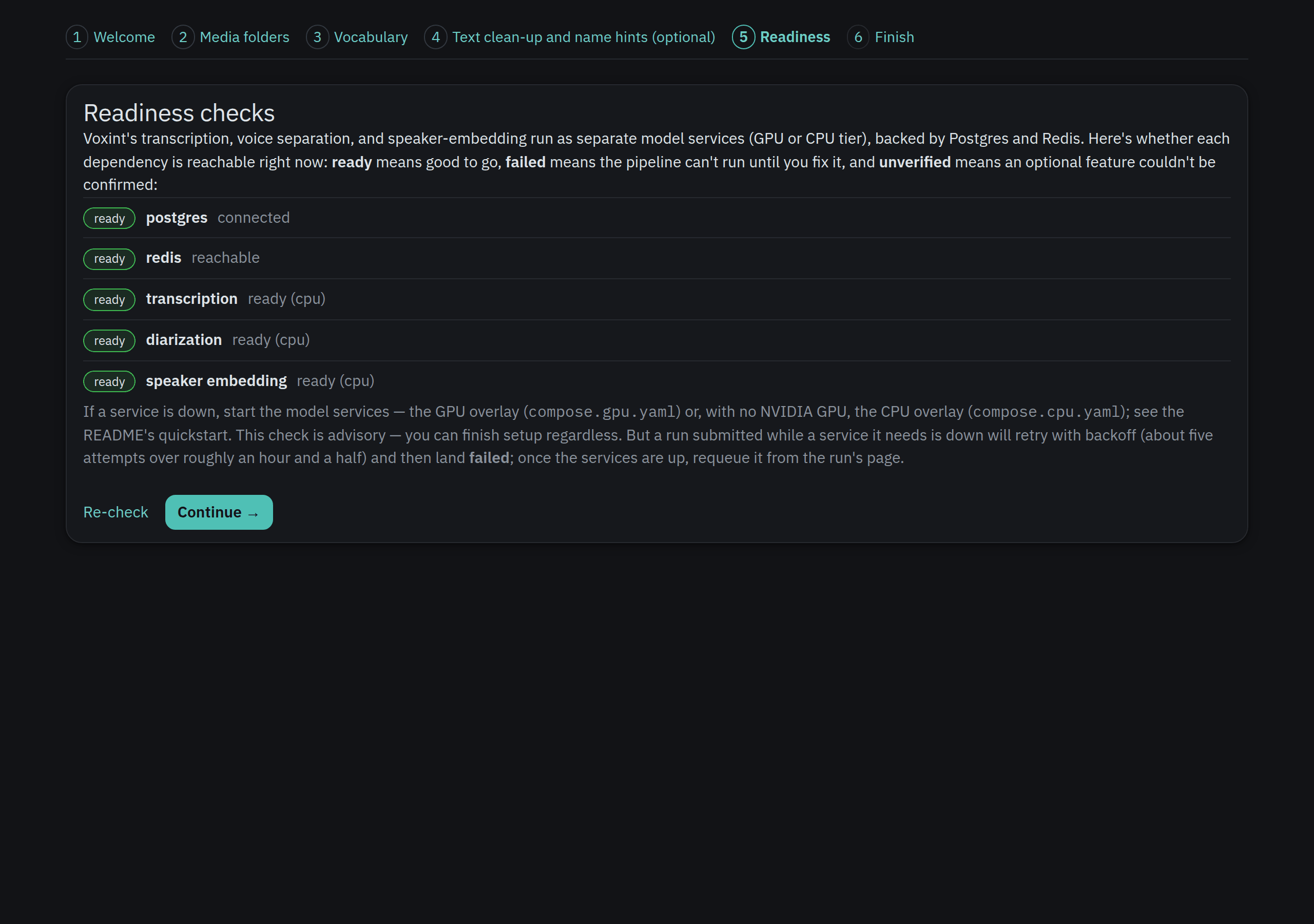
On a fresh install the onboarding gate holds the whole console at the wizard:
any authenticated page redirects to /setup (303) until setup is finished. That
is deliberate. /runs and /review are not usable first-run destinations until
onboarding completes. The gate is backed by a single-row app_settings table
(alembic revision 0006), which also stores the preferences the wizard collects.
The wizard is six steps, each optional and revisitable:
| Step | Route | What it does |
|---|---|---|
| Welcome | /setup |
Orientation; no input. |
| Media folders | /setup/folders |
A folder browser confined to MEDIA_ROOT: click into sub-folders and register the ones Voxint should watch, and optionally pick a domain pack per folder to tune transcription/enrichment (a "Default" leaves it unmapped). Browsing is re-validated on the server every request, so a typed or crafted path can never escape MEDIA_ROOT. The same panel appears under Settings → Media folders. An optional bounded scan (/setup/scan) then previews audio/video not yet known to Voxint and batch-registers it for transcription. |
| Vocabulary | /setup/vocabulary |
Names, jargon, acronyms, preferred spellings, one per line. Fed to both the Whisper initial_prompt and the LLM name-attribution context, so unusual terms transcribe and attribute correctly. |
| Text clean-up and name hints | /setup/llm |
Toggle optional transcript enhancement and set an OpenAI-compatible endpoint/model and API key. Best-effort by design: a slow or failing model never blocks a run, and enhancement is skipped. |
| Readiness | /setup/services |
Live reachability check of the ASR / diarizer / embedder model services (GPU or CPU tier). Advisory only; you can finish regardless. A run submitted while a needed service is down retries with backoff and eventually fails; requeue it from the run's page once services are up. |
| Finish | /setup/finish |
Commits onboarding and releases the gate. Two buttons: "Finish setup & start tutorial →" sets up (if needed) and launches the guided tutorial; "Finish setup →" goes straight to the console. The launch follows which button you press, not whether a tutorial already exists. |
Two behaviors worth knowing:
- Preferences apply per run, with no worker restart. Vocabulary and LLM
settings (endpoint, model, and API key) are snapshotted at the start of each
pipeline run (and resolved live for enrichment jobs and
voxint doctor), so a change takes effect on your next submission. You never bounce the worker to reconfigure. - The LLM API key can be set in the UI. Enter it on the LLM step (or later on
the Settings page); a saved key wins over env
LLM_API_KEY, which remains the seed/fallback. It applies system-wide: enhancement, the enrichment producers, andvoxint doctor. Leaving the key field blank keeps the saved key untouched (it is never shown again after saving); a "Remove saved key" checkbox reverts to the environment. The key is stored in Voxint's database in plaintext (fine for a single-operator local deployment, though note a database dump/backup contains it), and is never displayed, logged, or exported. You can still keep it env-only if you prefer: setLLM_API_KEYin.envand leave the UI field blank.
3. Guided tutorial
Voxint bundles a synthetic three-speaker sample and can stage it as a ready-to-adjudicate run, so you learn the review loop before using your own audio. No command line needed: on the wizard's Finish step choose "Finish setup & start tutorial →", or from the Settings page click "Set up & start the guided tutorial →". Either one stages the sample (idempotent, so an existing tutorial run is reused) and drops you straight into it.
The equivalent CLI seed still exists for scripted/maintainer setups (Docker
install only, since it execs into the api container; on the docker-free native
preview use the browser button above):
docker compose exec api voxint tutorial seed
A plain "Finish setup →" completes onboarding without starting the tutorial; you can always start it later from Settings.
The tutorial is a set of server-rendered banners injected above existing
console pages via a ?tutorial=<step> query parameter, not client-side
coach-marks (which are brittle under htmx fragment swaps). A banner renders only
when the query step matches the page it is on and the run is the configured
tutorial run, so a stray or typo'd ?tutorial= value never breaks the underlying
page. Five numbered steps ("step N of 5") walk the two-step review sequence,
who is speaking then check the words, end to end:
- Run (
/runs/{id}?tutorial=run): the sample, already transcribed and split by voice. Look over the stage ledger and the transcript. - Review (
/review?tutorial=review): claim the run so only you can rule on its voices. - Adjudicate (
/review/{id}?tutorial=adjudicate), Step 1 of the review sequence: attribute the three voices. One has a grounded machine match to accept; one shows a heard name that is only a guess (you decide); one has no name at all. Assign, enroll, exclude, or mark unknown, then continue to checking the words. - Check the words (
/review/{id}/transcript?tutorial=check_words), Step 2: read through the transcript and confirm the words, fixing any the transcriber got wrong. This is recommended, not required; your speaker rulings are what settle a run. - Export (
/review/{id}/transcript?tutorial=export): open the transcript and save it in whichever format you need. That is the whole loop: submit → review → attribute → check the words → export.
A terminal completion note then appears on the Settings page.
4. Settings page
Once onboarding is complete, Settings (/settings, linked from the sidebar)
is the durable entry point for configuration. Settings are organized into tabs:
- General (
/settings): appearance, feature toggles, re-run the setup wizard, and the guided tutorial. - Media (
/settings/media): media folders, automatic ingest, and sources and research. - AI (
/settings/ai): LLM enhancement (endpoint, model, and API key), translation, corrections, glossary, and semantic search.
Additional read-only tabs (Status, Hardware, Database, Plugins) show system health and configuration. When multi-user mode is on, the tab strip also has a Users tab. All settings save in place with their own CSRF tokens.
Key actions available after onboarding:
- Re-run the setup wizard (
/setup). It never resets existing preferences unless you change them. - Manage LLM enhancement (AI tab,
POST /settings/llm). Enable/disable enhancement and set the endpoint, model, and API key, the same controls as the wizard's LLM step. A saved key wins over envLLM_API_KEY; leave the key field blank to keep the saved one, or tick "Remove saved key" to revert to the environment. - Set up, start, replay, or complete the tutorial (General tab). When it has
not been staged yet, "Set up & start the guided tutorial"
(
POST /settings/tutorial/seed) stages the bundled sample and enters it, with no CLI needed. Replay (POST /settings/tutorial/replay) is non-destructive: it walks the sample again but preserves your previous rulings on the tutorial run. Completion (POST /settings/tutorial/complete) recordstutorial_completed_at.
Troubleshooting
- The console keeps redirecting to
/setup. Expected before onboarding completes; the gate holds every authenticated page there. Finish the wizard (through/setup/finish) to release it. - A vocabulary or LLM change "did nothing." Preferences are snapshotted at run start; they apply to your next submission, not to runs already in flight.
- Model-services step shows everything down. The core stack has no model
services; start an overlay, GPU (
compose.gpu.yaml) or CPU (compose.cpu.yaml). The check is advisory (you can finish setup), but a run submitted while a needed service is down retries with backoff (roughly five attempts over an hour and a half) and then lands failed; bring the services up and requeue it from the run's page. - Diarization output looks wrong (transcript shows fewer speakers than you heard, or a short clip splits one voice in two). Usually correct behavior being misread; see interpreting-diarization.md.
voxint tutorial seedreports an existing run. It is idempotent by design; the bundled sample is seeded once and reused. Use Replay from Settings to go through it again.- Enhancement won't enable. Either no API key is configured (neither a
UI-saved key nor env
LLM_API_KEY), or the configured LLM run budget doesn't fit the transcription stage lease. The LLM step (and the Settings LLM section) reports which; enter a key in the form to fix the first, and adjustLLM_RUN_BUDGET_SECONDS/STAGE_LEASE_SECONDSfor the second.